nav2

Showing posts with label storyboard. Show all posts

Sunday, October 24, 2010

Summer ends and project Piggy bank


Well, I worked all summer. No, it wasnt for a studio or anything like it. So I couldnt get more good stuff to put in my portfolio. So there is a lot of catching up for me to do now.


My 2d and 3d animation (malfunction and Stoneage) were shown at a couple of festivals, one of which the Moscow festival of Contemporary Animation . Unfortunately their website is in flash, so in order to see my entry, you need to go to English>Participant2010> and I am under number 44


EDIT: Just received a honorary letter from the general Producer of the festival.


And while being at it, here is a screenshot of the finalists page of CG coach awards, where you will find me listed. I am putting it on a screenshot, just in case they take the website down.


Second year of university started and I've been busy doing all sorts of class assignments. Somehow inbetween the whole chaos, there is still time for me to have fun with new software.

Let me first start with whats my homework for this semester. A 30 second (tops!) 3d animated film featuring a girl lifting a heavy object. I already had two storyboards which I was eager to do, but then a certain someone decided that students should have less choice. So the tutor gave me a list of types of characters and things they can possibly do.
This was the one that:
a) everyone else was not doing
b) tolerable (one of them "auditioning for x factor" urgh and they expect me to do it without any voice/sound)

So I picked the girl scenario and quickly scribbled this storyboard literally a couple of hours before the deadline:
https://docs.google.com/fileview?id=0B4WmGlTeh8z8ZTJhOTg1N2ItYjBmMi00MzRlLTgyM2EtNWQ1ZmY3NGE2ZTE3
I still feel that the ending is weak. Maybe I can change it somehow.

And here is the concept art that I made:
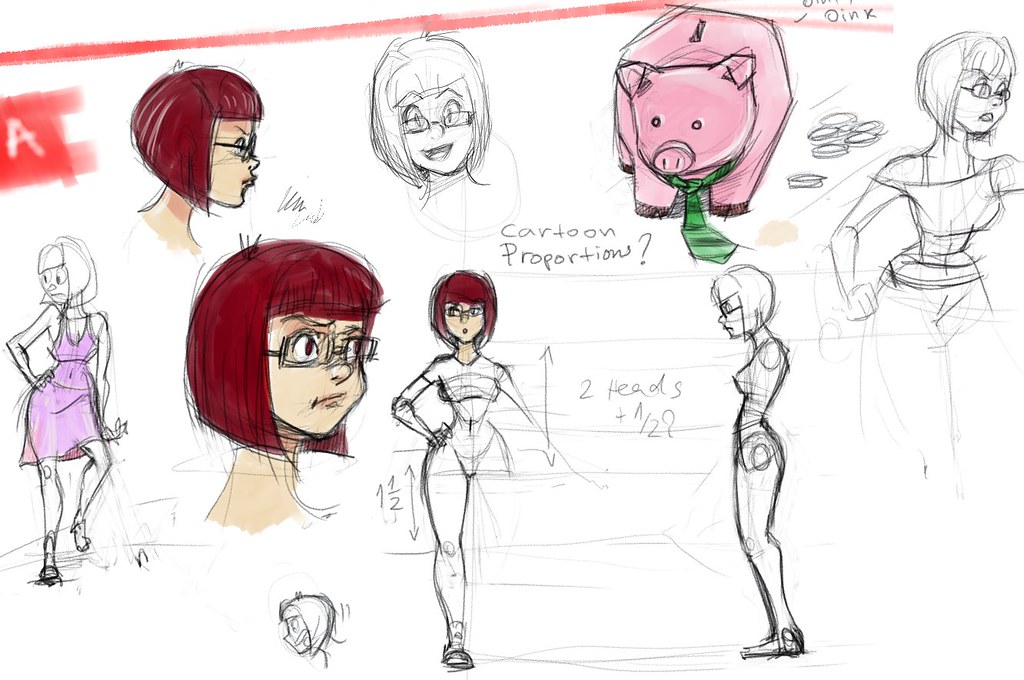

Made with my favorite open source painting app- Mypaint

And then I modeled the girl with zbrush, fixed her topology on the hands and added detail in Maya. The retopology tool in zbrush 3 would create holes in the area of the hands. So the easiest approach there is to just do the tricky parts in Maya or blender.

Next on is UV mapping and texturing. Since the character is with a cartoony design, I decided to avoid putting much realistic details. With 3d its very easy and tempting to make the model pointlessly detailed, but less can be more in this case. UV mapping and texturing was done in Blender 2.54 and took a couple of hours.

Blender-uvSeamsScreenshot

I decided to give the new Blender a try, because it has some tools that are better than Maya's at the moment. Uv unwrapping and sculpting mode are especially nice in blender. My hope to see a better sculpting mode in Maya is almost nonexistent since Autodesk also owns Mudbox and likes it when people keep buying it.:P So yeah, its also 0$. Of course it has some annoyances and quirks, but the more I use it the easier it gets. Texturing mode in blender lacks symetry, or at least I couldnt find it. Also pressure sensitivity for my tablet model didnt work, so I made the simplest most basic texture possible.

blender-polypainting

Her shape still needs some tuning. I will use belnder's sculpting mode to fix the hips/legs and head. I noticed that when I import it and soften the edge normals in Maya, her proportions look kind of different to the eye. That might need some adjusting too.

My goals with this animation are:
-learn Blender 2.5 and integrate it in the pipeline (70% done- I need to learn more)
-use maya dynamics - Maya hair or Maya cloth, but keep it very cheap on CPU/render time. Do that after the animation is complete.
Deadline is till the end of semester one. This new knowledge will help me create the next project- a storyboard that I've been working on for a while now.

Wednesday, April 7, 2010

Stone age - animation progress

Before doing any animation on this, I keyed an animatic camera and a proxy of my character moving around, so I get my timing,positioning and scale right.


Why not directly animate the global control of your character move and do it on a proxy instead? Well, duh- have you tried keying a character that constantly moves?

The second thing I did was writing a rough draft of all the movement of my characters - when do those cycles start and end...


Aand after doing that, I came up with even more jokes and funny little moments that you wouldn't see in my early animatic, making this even a bigger task than it already is.

I have to say that I really am loving maya's keyframing ability and all the little controls that the system will let me create for my characters.


I have gotten roughly 40% of the animation done (in the first week). It's faster/easier than I originally thought it would be. I found some annoyances in my character sets- mostly the skinning and the lack of squash and stretch, which wouldnt let me do some of the things that I would like to do to my characters.I also had to create some extra props and controls for them as well...fix a constrain mistake I made on the spear xD..
I am learning a lot right now, while having fun.


It's interesting what one man can do in a bit more than a month. Animatic and a story, 2 animatable characters- with textures and everything, backgrounds,props with their controls and almost half of the animation is done. And I am only learning Maya. Imagine after I get some more experience.This is my first 3d animation after all.

Sunday, February 28, 2010

3D character animation assignment- storyboard and topology

I just started planning out my short 3d animation for character animation assignment. The deadline is the end of April or something like that.

My idea is a bit too ambitious for such a short deadline, but I also came up with a plan B story for it, that doesn't involve me modelling and animating a mammoth.


(animatic done with toonboom storyboard trial)

The production pipeline path that I am going to take is going to be slightly different from every one else's in the class. Since I've been using z-brush for almost two years now, I decided that it will cut some of production time.


1 modelling:
sculpt in zbrush---->retopology in zbrush--->export to maya and do some tweaks on topology


Making an animatable topology mesh in Z-brush and exporting it to maya is incredibly easy, though it had some quirks. Some people might say that it will take more time to do it with Z-brush, because then I have to redo the topology after I sculpt the character. To those people I say- no. It's far simpler and empowering. I get the shape to look exactly as I want it and focus on topology afterwards. So I do better at both shape and topology and I have greater control over the end result. I sculpted my mesh and then redid the topology in z-brush (If I export a high poly mesh it will just crash maya) so I made an adaptive skin (copy of the hi poly mesh) with proper topology and 2 subdiv levels stored in it. I just needed to add some extra edgeloops in maya.

Wednesday, February 24, 2010

Adding sound to Toast! animation

The name of Toast! was changed to "Malfunction". Decided that I don't want to give away the ending too much with the title.


Adding sound to the animation

The sound in Toast! is really low on quality standards. After seeing it for the first time with sound, I thought that it was horrible.

Some of the sound effects were recorded by myself. For the robot , I used the creaking door of the kitchen at the halls. The title screen sound was made by a real empty tin can (from mexican beans) and a pencil.


The bucket sounds, electricity and so on were taken from the internet, after carefully examining their license.

The Music in the end is made by me, with my Nintendo ds. I used "Jam sessions" imitation of guitar. You might notice that the rhythm is the same as the title sceen sound.


The voices were recorded and edited with Audacity. My brother did his goofy/mickey mouse rip-off voice, as my voice is too deep to imitate a boy's.

All and all, I hate the sound in "Malfunction". It's messy and badly edited.You can even hear some static sounds in the background. Flash has a real nice way of setting the volume ease out and ease in and I played with that too alot.

Tuesday, February 2, 2010

Toast! storyboard ver1

Today I got some valuable feedback for the storyboard from my animation tutor at uni, who also has a blog here . He liked my storyboard. I am really glad that there is someone like him to show it to, because he's a guy with experience and his feedback is valuable..

Here is what I got this far:
First of all, the rules of my assignment do not allow me to make the animation longer than 30 seconds. But I have too many shots put in that small time window.And the duration of some of the shots is too short. So 10 seconds must go. For that I must cut out some of the first shots. Some other scenes need a slight change in the camera and the composition (more space between and around characters).


after thinking about it, I decided to make a short version of my animation (for the module assignment) and later a longer one which will be as much as at least 2 minutes!

Before editing my storyboard , I would like to post it in the name of good documentation and progress evaluation. So here it is, no revisions- purely as it came out of my mind:

Toast! storyboard ver1 01.02.2010


I used software called Toonboom storyboard to do it. You can download a trial version, but you should export your work as a video/pdf before you close the app, because if it has over 30 panels, you are not going to be able to open it again.

It's a really awesome application for storyboards- simple and powerful. This storyboard took about 2 hours to make with it.