nav2

Showing posts with label Adobe. Show all posts

Monday, February 16, 2015

Some hired work from the 2011 - graphics and mockups for tablet games

Back in 2011, I had the pleasure of signing up for a part time job with Cogworks studios  -as artist/animator . I made graphics and mockups for a bunch of iOS games/Apps. There was an opportunity to go full time, however I was in the middle of my second year at the University of Bradford - there were a lot of assignments stopping me from doing that. Also UK students are not allowed to work for more than 20 hours per week.


We used toggl to track my time each month. Sadly university took a lot of it and as you can see from one of my reports- I wasnt able to spend too much on concepts.

There was of course a non disclosure agreement with the job. Those type of agreements usually have a period of time - in this case 3 years - in which I am not allowed to release any information or show any of my work publicly. Well since 4 years passed I said to myself - What the heck, Let's do it. I am going to share with you some of the more fun ones. :)

Please note that some of these were quickly made sprites - used to put together a prototype for a few games. They were in no shape or form the final product. The names I am giving the games are not the final product names.

One of the projects was to do a game in a frame concept for Team 17. The deadline was very tight, so it's not very polished. I am not going to go into detail about the game ideas or design, since none of that was my work.

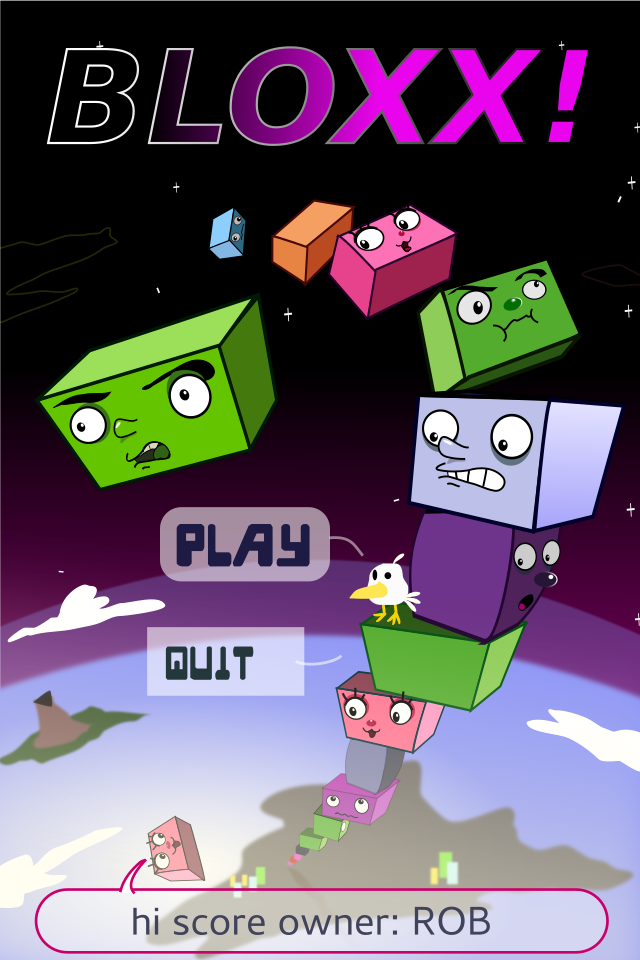
There was another ongoing project for a Jenga-like game where you stock blocks ontop of each other. I made a title screen, two backgrounds and animated sprites for the blocks. Each block had a face with a different character. Doing the backgrounds was really fun, since they were vertically very tall. We had a level where you stack blocks all the way into space, another one which started deep underwater and kept going until reaching the surface and so on. I had to use illustrator on that one, since it had better export tools.


There was a Bird in a factory game project where I made a number of bird concepts for. Then when we picked one of them - I made a fully playable animated sprite for the bird- run, idle, death, etc.
Some of the background elements also had to be animated - smoke, saw, travolator, etc etc. Those were simple enough to just do in Inkskape. I had set up for myself a script in linux that exports the svg layers as an image sequence. And another one which makes a gif file from the image sequence  (for presentation purposes). That saved a lot of time.

 I made an entire spritesheet in inkscape. There was no premade concept art, but the guys at Cogworks gave me some direction as to what animations they are going to need and some of the specific gameplay event items. I had some creative freedom in coming up with various hazards for the little bird though.

Overall these were fun projects for me and working with Cogworks was a real pleasure!
I do hope that they get to complete/release some of these games some day. Looking at my work from 4 years ago, I can't say that I am completely pleased with it. Surely it can do with a lot more polish! If these games ever get on production schedule, I would be more than happy to work on them full time.

Friday, February 19, 2010

Flash CS4 bugs and how I managed to get over them

This is my second rig for the boy, which I made sure will be more stable and more controllable than the first I made:


Obviously I had to take it apart and mess it up to demonstrate the set-up. The only symbols of the rig that contain variations/animation are the hands and the head, thought in some cases it might be useful to have that for the torso as well. One thing that could have been done to improve this is to make it possible to move the character's shoulders by adding one extra chain with a hidden symbol between the neck and the upper arm.


Bugs in flash cs4
Here is my report on problems I met while doing my Toast! animation for Bradford university. I might have to add some more to the list, as it is not completely finished yet.

Bugs with the rigs/ rigged symbols:

*Bug: Head symbol animation won't play properly timed in test movie/exported file, thought it plays just fine in flash cs4. It will freeze on the first frame it is set to start from
+fix: When you have an armature layer, be sure to set it to start from frame 1 and it doesnt have any blank space before it starts. Put it in a symbol and have that symbol start the armature animation inside from frame one.You can tell the head symbol to start from whichever keyframe it starts in the particular scene in the armature itself.


*Bug: After the armature is keyed and animated, for some reason its messing up the pivot points and that causes limbs/head/bodyparts to fall off.Even when you move them to attach them back, that breaks their position in previous keyframes.
+fix: Quickest way is to just start over and
DO NOT DO the following after you start keying the armature (you can only do it before you animate), it will cause this bug:
--don't use the transform tool on the armature layer- be it parts of the armature or the whole layer.If you need to move the whole model, put it in a symbol or set the armature in a way that lets you move it (enable movement on root or skeleton).
--don't touch any pivot points
--don't alter any of the constraints that you have already set up. Be sure to check that you don't have to add or take value before you start animating. You can enable and disable rotation and so on, but you can not touch the constraint values that you have set before animating.
--Don't ctrl(+shift)+up/down -- arrange the symbols -- after you start keying your armature. It might cause weird problems.

*Bug: After copy-ing the symbol that contains armature animation and transform-->flip it horizontally on a keyframe, that flips the symbol everywhere else (in all scenes that it is used in)
+resolution- I couldnt quite find a solution to this problem. In my animation,I had to turn my character to the other direction and make him run. The only way to do that was to create another armature and use most of the symbols from the previous one.


*Bug: If you have multiple symbols on one layer ,and you select them ,right click and choose "distribute to layers", Flash CS4 might either give you "unknown error" or crash altogether,losing all your progress.
+ to avoid: dont "r.click>distribute to layers" many symbols and especially if they contain other symbols. Save your progress before doing that.

Flash CS4 symbol armatures can NOT do the following things:
You can not set loop/start/single frame on every keyframe of the armature's layer. If you need facial animations, you can only tell the armature where to start from, so the whole timing of that animation must be inside the (head) symbol itself, no cheating there.
You can not put any blank keyframes in the armature layer.
If you resize it in timeline, it will also alter the timing of the animation, it will take away or add space between your keyframes (really annoying!)

You can not really move any keyframes of the armature layer. You can only cut and paste them one by one (no multiple select). Some times it just does not work at all. When you paste a keyframe of a pose, it just adds the keyframe there,but doesnt add the pose itself.

Shape armature: Its somewhat limited and hard to move. It makes the file harder to play. You can not attach it to a symbol armature,which is a real pity.You also have to use the bind tool to skin the shape. The bind tool has one of the worst gui's I have ever seen in my life. It's deformation point markers are huge and often overlapping each other, even when you zoom as much as possible. That makes it hard and even impossible to select individually (or see for that matter) some of the control points (or most of them).So when you make a shape to rig, for the love of god, draw the shape with the pen tool- use as less as possible control points!


My overall impressions of Flash CS4:
Shame on you adobe, for releasing such a bug-riddled version of flash! It introduces the new ik features,but It is so buggy and limited, that it is somewhat better to avoid using ik if possible. If you want to have nice IK structures and parenting, go for Anime studio (moho) or toonboom Animate. Both are nicer for animation , more stable and probably cheaper as well. Flash CS4 has caused me some grief, but I think that I managed to establish some control over some of it's new features.